
Founding clinics programme: limited placesRequest a demo

Oclivo AI and consultation

An assistant that documents and proposes. You decide.

Dictate the visit, let Oclivo AI organise the draft and confirm what it proposes. It does not diagnose: it documents, organises and proposes, and every change goes through your hands and is kept in the audit log.

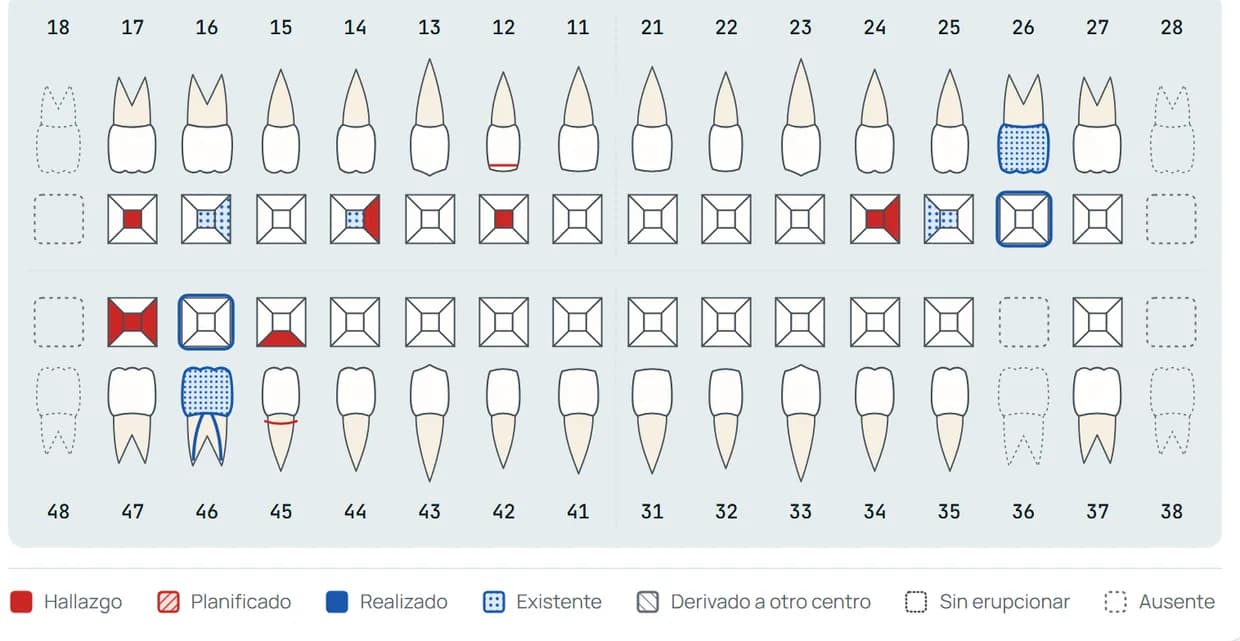
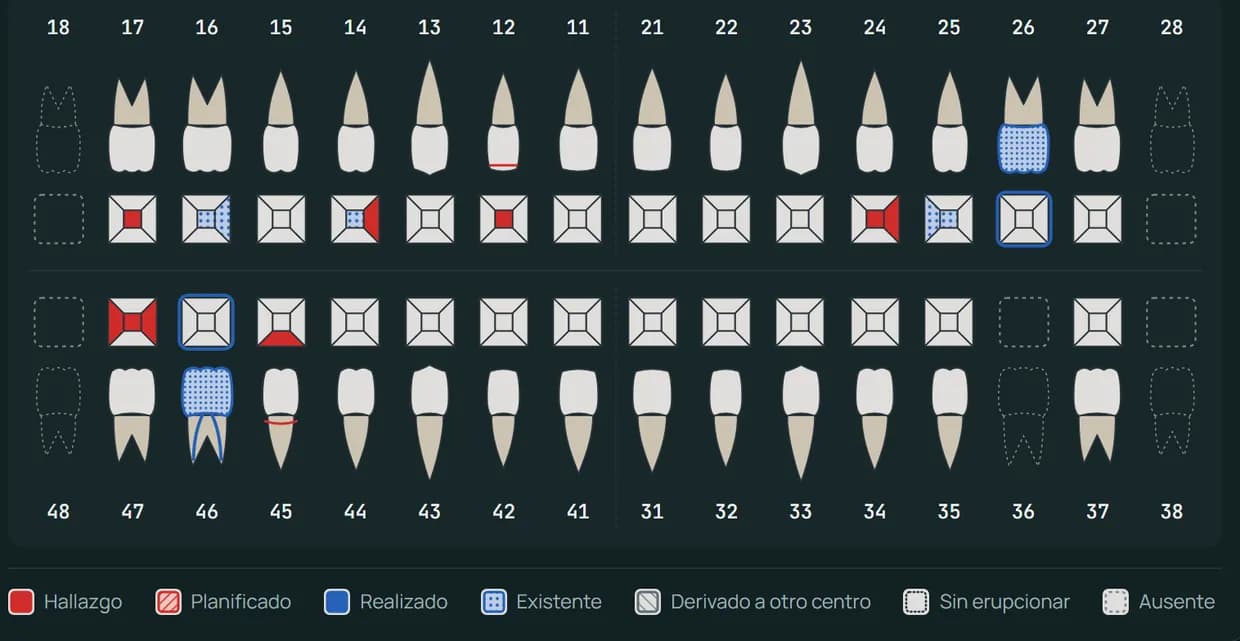
Odontogram of a sample patient with findings, finished work and missing teeth
Record header with the patient's medical alerts: anticoagulants, penicillin allergy and controlled hypertension
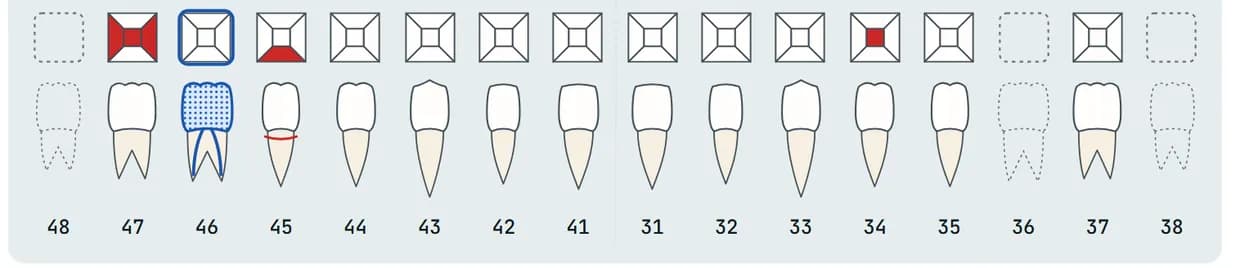
Lower arch of a sample patient: tooth 34 with an occlusal caries

Voice dictation

Dictate what you see and review before saving.

Say, for example, “fourteen mesial caries” and the odontogram notes it in a draft. The audio is not saved and nothing is recorded until you confirm it.

  • Odontogram in draftEvery dictated order stays in the draft. The doubtful ones are marked “To review” and nothing is saved until you press “Save changes”.
  • Periodontal chart by voiceDictate tooth, face and the three depths (“sixteen buccal, three two three”), “recession one” or “bleeds mesial”. The values enter the exam draft, which is not closed until you close it.
  • The audio is not savedThe recognised text only lives on screen. If your computer has no microphone, you can use your phone by scanning a QR code.
Odontogram dictationSample
Microphone offThe audio is not saved

Heard

«fourteen mesial caries»

Dictated orders

14Caries · mesialSaved

Orders stay in the draft until you press “Save changes”.

Save changes

Two-phase actions

It proposes, you edit and confirm.

Ask it for an appointment, a task, a schedule block or the follow-up of a quote from any screen. Oclivo AI leaves it as a proposal: until you confirm, nothing changes.

  • The proposal comes firstIt prepares appointments, schedule blocks, tasks, quote follow-ups, medication, findings and treatments for the odontogram, and quote drafts.
  • You edit and confirmBefore confirming you can correct the date, the duration or the title, or reject the proposal. If nobody decides, the proposal expires.
  • With your permissions, in the audit logOn confirming, the permissions of whoever confirms and the patient's clinic are checked. Every confirmation and every rejection is kept in the audit log.
Oclivo AISample

Book Lucía Pérez on Tuesday at 11.

Create appointmentChange saved
Patient
Lucía Pérez
Date and time
13 Oct 2026 · 11:00
Duration
30 minutes

The appointment has been created in the schedule.

Audit log

Alba Ferrer confirmed “Create appointment”.10:42

Treatment plan

The plan by phases, the quote with alternatives and the signature.

What is planned in the odontogram is grouped by phases, with the price from the patient's tariff. Offer alternatives and the patient chooses and signs on screen, at the clinic or from a secure link.

  • Plan by phasesGroup what is planned into phases and see what is accepted, in progress or done.
  • Alternatives to choose fromCreate another option by copying what is still planned. When one is accepted, the others are cancelled and what has already been done does not change.
  • Signed acceptanceThe patient chooses which treatments to accept and signs. The acceptance is fixed in a signed document and you can follow the quotes that have no answer.
Treatment planSample
In progress3 of 6 treatments done
  1. Phase 1Completed2 of 2
    • Dental hygiene€55.00
    • 17 · Composite filling (1 surface)€60.00
  2. Phase 2In progress1 of 2
    • 36 · Root canal€190.00
    • 36 · Build-up€95.00
  3. Phase 3Planned0 of 2
    • 36 · Zirconia crown€420.00
    • Occlusal adjustment€35.00
Total€855.00
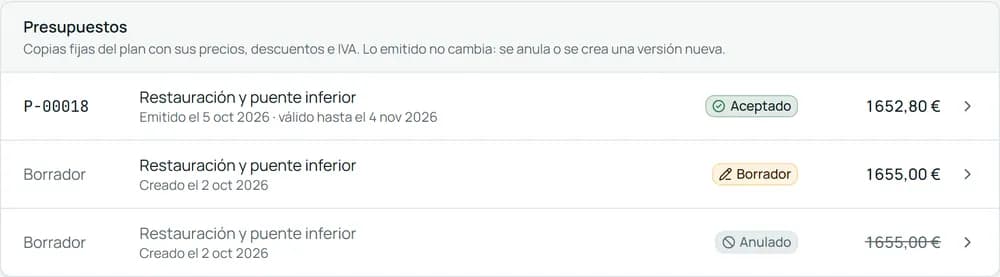
Quotes of a sample patient: one accepted, one draft and one cancelled

Queries and report reader

Query with the file at hand and read reports without typing them.

Ask about doses, interactions or protocols: the answer comes only from the knowledge bases and cites its sources. Upload a medical report and review, line by line, what the AI proposes to note in the file.

  • With sources or no answerIf no knowledge base supports the answer, it does not answer. It only guides and writes nothing in the record.
  • The file, without the nameIf you choose a patient, the query only takes their age, allergies, conditions and medication into account. Never their name or contact details.
  • Medical report readerUpload a report and the AI proposes medication and alerts. Each line is corrected, saved or discarded on its own: nothing reaches the file without your confirmation.
Clinical querySample

What interactions does ibuprofen have with the patient's medication?

With the patient's reduced context:

  • age
  • allergies
  • conditions
  • medication

Source 1Base: Oral surgery · page 3

It only guides: the answer cites its sources and writes nothing in the record.

Reading review

2 to review
  • MedicationAtorvastatin 20 mg
    Save this oneDiscard
  • AlertPenicillin allergyDoubtful reading
    Save this oneDiscard

Inside the file

Alerts, prescriptions and consents, where you need them.

What must not go unnoticed is in the patient's file: the medical alerts in view, the prescription with its safety checks and the signed consents.

  • Medical alerts in viewAllergies, anticoagulants and risks in the header of the file, with confirmation of reading.
  • Prescriptions with checksPrepare the private prescription with your prescriber details and print it. It warns of declared allergies, interactions and maximum dose, with the official AEMPS data sheet at hand.
  • Signed consentsAsk for the consents each treatment requires and sign them on the clinic's tablet or from a secure link. A record is kept with an integrity check.
Patient fileSample

Medical alerts

Penicillin allergyAnticoagulantsReading confirmed
Amoxicillin 500 mgPrescription safety checkDeclared allergy: blocks issuing

Informed consent

Signed

Signed on the surgery tablet

Radiology

Radiographs and photos in the file, with their own viewer.

Keep radiographs, clinical photos and 2D DICOM in the patient's image archive, annotate and compare them without leaving the file.

  • Its own viewerAnnotations, measurements and saved versions on radiographs, photos and 2D DICOM. You can also upload them from your phone.
  • Compare and documentCompare two images with a curtain or side by side, build before-and-after sets with template photo series and generate the radiology report as a PDF.
  • CBCT and 3D scans, partialOpen the slices and volume of a CBCT, and STL, PLY and OBJ meshes, in its viewer. It is a first version: measurements in millimetres and comparison are still missing.
Image archiveSample
  • Panoramic
  • Periapical 36
  • Clinical photo
  • Measure
  • Compare
  • PDF report

Version 2 saved with its annotations

CBCT and 3D scan viewer

Partial

First version: measurements in millimetres and comparison are still missing.

Everything it includes

The features of this area that exist today in the application, with sample data.

  • Visit note

    Dictate the visit and get the note as a draft, with your template. It documents, it does not diagnose.

  • Odontogram dictation

    Dictate “occlusal caries on 36” and it stays in draft until you save.

  • Periodontal chart dictation

    Dictate depths, margins and bleeding; they enter the exam draft.

  • Two-phase actions

    The AI proposes, you review, edit and confirm: until you confirm, nothing changes.

  • Assistant on any screen

    Ask it about patients, schedule and quotes, or ask it to open a screen.

  • Prepared drafts

    Ask it for an appointment, a task or a schedule block and it leaves it ready for you to confirm.

  • Talk to the assistant

    Hold to talk and, if you want, hear the answer in your browser's voice.

  • Phone as a microphone

    Use your phone as a microphone by scanning a QR code, without keeping the audio.

  • Clinical and pharmacological query

    Check interactions and protocols with the patient's file at hand. It only guides.

  • Medical report reader

    Upload a medication report and review what the AI proposes to note.

  • Pre-visit summary

    Before going in, see what matters about the patient at a glance.

  • Treatment plan by phases

    Group what is planned into phases and see what is accepted, in progress or done.

  • Quotes with alternatives and signature

    Offer options, and the patient chooses and signs on the tablet.

  • Medical alerts always in view

    Allergies, anticoagulants and risks in view, with confirmation of reading.

  • Prescriptions

    Prepare the prescription with the prescriber's details and print it.

  • Informed consents

    Ask for the consents each treatment requires and sign them on a tablet or by link.

  • Radiographs and clinical photos

    Keep radiographs, photos and 2D DICOM in the patient's image archive.

  • CBCT and 3D scan viewer

    Partial

    Open CBCT and 3D meshes without leaving the file. Partial feature: measurements in millimetres and comparison are still missing.

  • Bridge with x-ray programs

    Partial

    Bring the images from your x-ray program into the file with a local bridge. Partial feature, in preparation.

Frequently asked questions

What clinics usually ask about this area.

Next step

Oclivo thinks of everything. You think of your patients.

Request a demo and go through your schedule, your odontogram and your payments with us, with sample data. No commitment and no lock-in contract.

Before, during and after the demo, there are real people on the other end.